You are able to share your custom profiles with the community and allow them to download and save to their PC.
NOTE: This feature is only for PC users and not those on console. Console users can create custom profiles or use the official profiles.
STEP 1 - LOCATE YOUR CUSTOM PROFILES
You first need to locate your custom profiles you have created.
MSFS 2020 USERS
You will find your custom profiles in your MSFS 2020 WASM folder located here:
C:\Users\[USERNAME]\AppData\Local\Packages\Microsoft.FlightSimulator_8wekyb3d8bbwe\LocalState\packages\sofly-aerotone\work\profiles
MSFS 2024 USERS
You will find your custom profiles in your MSFS 2024 (2020 product) WASM folder located here:
C:\Users\[USERNAME]\AppData\Local\Packages\Microsoft.Limitless_8wekyb3d8bbwe\LocalState\WASM\MSFS2020\sofly-aerotone\work\profiles
STEP 2 - SHARING FILES
Inside of these folders, you will have all of your custom profiles.
You just need to share any of these files to any upload service of your choice.
Just remember, any files you share may still be protected by SoFly Copyright and you do not become the sole owner of the files. We may, with or without permission, then use these files to create ‘Official’ profiles in the future to share with more users. You will be credited.
STEP 3 - ADDING TO YOUR COMMUNITY FOLDER
Locate the AeroTone ‘Community’ folder, found inside the work directory you looked for earlier when searching for your custom profiles. Instead of ‘profiles’ at the end, it is ‘community’.
IMPORTANT
THIS IS NOT YOUR FLIGHT SIMULATOR COMMUNITY FOLDER.
This is an AeroTone ‘Community’ folder.
Your simulator must not be running.
MSFS 2020 USERS
You will find your custom profiles in your MSFS 2020 WASM folder located here:
C:\Users\[USERNAME]\AppData\Local\Packages\Microsoft.FlightSimulator_8wekyb3d8bbwe\LocalState\packages\sofly-aerotone\work\community
MSFS 2024 USERS
You will find your custom profiles in your MSFS 2024 (2020 product) WASM folder located here:
C:\Users\[USERNAME]\AppData\Local\Packages\Microsoft.Limitless_8wekyb3d8bbwe\LocalState\WASM\MSFS2020\sofly-aerotone\work\community
Simply drop any AeroTone profiles here.
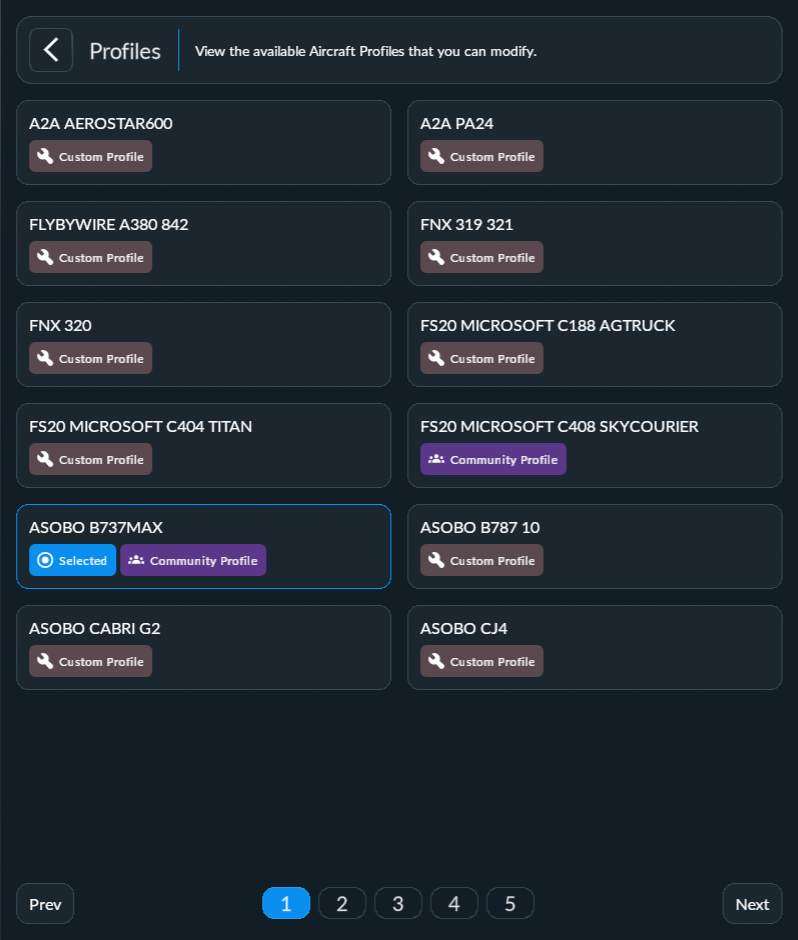
Load up your simulator again, and now you will see Community Profiles in AeroTone’s Aircraft Profile screen.
Was this article helpful?
That’s Great!
Thank you for your feedback
Sorry! We couldn't be helpful
Thank you for your feedback
Feedback sent
We appreciate your effort and will try to fix the article