Each profile has multiple tags associated to it.
ACTIVE
This is your current ACTIVE aircraft in the simulator. Your current settings on the main page are drawn from this.
SELECTED
This is the current PROFILE loaded in your simulator. These are the AeroTone profile settings you are EDITING from the main panel menu.
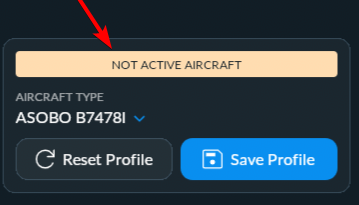
Any changes you make with the profile SELECTED will be saved to the SELECTED profile. You can tell if you are not in an ACTIVE aircraft by the warning on the main panel menu, saying “NOT ACTIVE AIRCRAFT”.
You then have tags for:
Community Profiles
Custom Profiles
Official Profiles
NOTE:
When editing profiles for SELECTED profiles, you will hear the sound effects applied to that profile, not the loaded aircraft. You must then save. Once you select the ACTIVE aircraft, you will hear the sounds for your loaded plane.
Was this article helpful?
That’s Great!
Thank you for your feedback
Sorry! We couldn't be helpful
Thank you for your feedback
Feedback sent
We appreciate your effort and will try to fix the article